Most Selling Disposable Vapes 2026



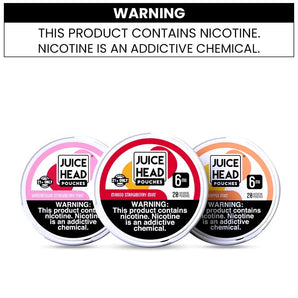
A Geek Bar Pulse 2 that suddenly stops producing vapor can be frustrating, especially if the device still shows battery or e-liquid remaining. In many cases, the problem is something simple, such as a blocked airflow path, an overly long draw, or a charging issue.
The Geek Bar Pulse 2 is a rechargeable disposable with an 800mAh battery, USB-C charging, a 0.8Ω dual mesh coil, adjustable airflow, and two operating modes. Because several components work together, different symptoms can have different causes.
New to the device? See our complete Geek Bar Pulse 2 25K review for the full specs and performance breakdown.
If your Geek Bar Pulse 2 is not working, not hitting, producing weak vapor, or not charging, use the steps below to identify the problem.
If you take a draw and get no vapor at all, start with the simplest possible causes.
The Pulse 2 has adjustable airflow. If the airflow is set too tightly or something is blocking the intake, the device may not activate properly.
Try:
Checking the airflow setting.
Opening the airflow slightly.
Making sure your fingers aren't covering the airflow openings.
Checking the mouthpiece for visible debris or blockage.
Avoid inserting sharp objects into the mouthpiece or device. If the airflow remains blocked, the safer option is to stop using the device rather than trying to dismantle it.
The Pulse 2 is draw-activated, meaning it activates when you inhale through the mouthpiece.
Try a steady, moderate draw rather than an extremely forceful or unusually long one.
If it still produces absolutely no vapor, check the display. If the screen shows a depleted battery or empty e-liquid level, that may explain the issue.
The Pulse 2 has Regular Mode and Pulse Mode. Pulse Mode is a setting on the Pulse 2, not a separate device.
If the device is functioning but the experience feels different after changing modes, check which setting you're currently using before assuming something is wrong.
Getting some vapor but noticeably less than usual is different from getting no vapor at all.
Several things can cause weaker output.
If the battery level is low, the device may not perform the same way as it does when adequately charged.
Connect the Pulse 2 to a suitable USB-C charging setup and allow it to charge. The manufacturer states that its fast-charging system can reach around 80% in approximately 15 minutes under the specified conditions.
Once charged, try another draw.
Airflow has a direct effect on how a draw feels.
If the airflow is too open, the draw can feel lighter and the vapor may seem less concentrated. If it's too restricted, the device may struggle to provide a comfortable draw.
Try adjusting the airflow gradually until you find the setting that feels right.
Very frequent or unusually long draws can also affect the experience.
If the device has been used heavily for an extended period, give it a short break before trying again. Avoid repeatedly taking long draws simply to test whether the device is working.
The Pulse 2 has a display that helps you monitor e-liquid status.
If the e-liquid is getting low, reduced flavor or vapor can occur. Once the available e-liquid is depleted, the device isn't designed to be refilled.
Do not attempt to add your own e-liquid to the sealed disposable.
The Dome Full Screen display is one of the Pulse 2's most noticeable features. It provides information such as battery, e-liquid, and mode status.
If the display isn't turning on, first check whether the device is otherwise responding.
Because the Pulse 2 is draw-activated, the screen may respond when the device is activated.
Take a normal draw and see whether the display or device indicators respond.
A depleted battery is one of the first things to rule out.
Connect the device using its USB-C charging connection and check whether the display or charging indicators respond.
If the device shows signs of charging, allow it to charge before testing it again.
If nothing happens when connected:
Make sure the USB-C connection is seated properly.
Try another compatible charging cable if available.
Check the charging port for visible dust or debris.
Don't force the connector into the port.
If the display remains completely inactive and the device doesn't respond after charging, it may have a hardware issue.
Don't open the device to investigate internal components.
For more on how the VPU and Dome display work together, see our VPU and Dome Display explained guide.
If your Geek Bar Pulse 2 is not charging, start by checking the basic connection.
A damaged or faulty USB-C cable can prevent charging.
Try a known-good compatible cable and make sure both ends are properly connected.
Look at the USB-C port for visible dirt, lint, or damage.
If you see debris, don't push anything sharp into the port. A damaged charging port can also prevent the device from charging correctly.
If the battery is very low, the charging indicator may not appear instantly in every situation.
Connect the device properly and give it some time before checking again.
Stop using the Pulse 2 if you notice:
Physical damage
A damaged or unusually hot charging area
Liquid leaking from the device
Swelling or other unusual changes
Burning smells unrelated to normal use
Don't attempt to repair, open, or modify the battery or internal electronics.
If the device won't charge after trying a suitable cable and connection, contact the retailer or manufacturer for support rather than attempting an internal repair.
Flavor can change as a disposable vape approaches the end of its usable e-liquid.
If your Pulse 2 begins producing noticeably less flavor, check the e-liquid indicator on the display.
A fading flavor can simply mean the device is nearing the end of its usable life.
However, a strong burnt taste is different. If you experience a persistent burnt taste, stop using the device rather than repeatedly taking draws to see if it improves.
Avoid trying to fix a sealed disposable by opening it, adding e-liquid, replacing the coil, or modifying its internal components.
The Pulse 2 is designed as a sealed, single-use rechargeable disposable, not a refillable or repairable device.
Simple checks can resolve issues such as low battery, airflow settings, or an improperly connected charging cable.
But not every problem has a user-level fix.
Stop troubleshooting and seek retailer or manufacturer support if:
The device doesn't respond after charging.
The charging port appears damaged.
The device is leaking.
The device becomes unusually hot.
The device has visible physical damage.
The display remains completely unresponsive.
You notice unusual smells or signs of battery damage.
Most importantly, don't disassemble the Pulse 2. Its internal battery and electronics aren't designed for user repair.
When your Geek Bar Pulse 2 isn't hitting or producing vapor, don't immediately assume the device is defective.
Start with the basics: check the airflow, take a normal draw, check the battery and e-liquid indicators, and make sure the USB-C connection is working properly.
For weak vapor, airflow and battery level are two of the first things to check. If the Dome display isn't responding, charging the device can help determine whether the battery is simply depleted. And if flavor fades toward the end of the device's life, check the e-liquid level before assuming there's a technical problem.
If your Pulse 2 still isn't working after these basic checks—or if you notice physical damage, overheating, leaking, or another unusual condition—don't open or modify the device. Contact the retailer or manufacturer for further assistance.
If you're looking for a fresh device, you can also explore the Geek Bar Pulse 2 25K at FlyingVape and read our complete Geek Bar Pulse 2 review for a deeper look at its features, performance, and specifications.
Nicotine products are intended for adults of legal purchasing age only. Nicotine is addictive. Check your local laws and regulations before purchasing or using nicotine products.
Your cart is currently empty.
Start Shopping