
Most Selling Disposable Vapes 2026





The Geek Bar Pulse 2 25K is more than a higher-puff version of the original Pulse. Geek Bar also upgraded the technology inside the device, added a new display system, and introduced adjustable airflow.
Two of its most noticeable features are the upgraded VPU and the Dome Full Screen display with Binary Orbit Light System. But what do these features actually do?
For the complete device breakdown, see our full Geek Bar Pulse 2 25K review.
If terms like VPU, dual mesh, and Binary Orbit sound complicated, this guide breaks them down in plain English.
The VPU is part of the technology that manages how the Geek Bar Pulse 2 operates. In simple terms, it helps coordinate the device's battery, coil, e-liquid delivery, and overall performance when you take a puff.
That matters because a disposable vape needs to balance several things at once. It needs to produce vapor while managing its available battery and e-liquid.
The Pulse 2 uses an upgraded VPU system compared with the previous generation. Geek Bar's stated improvements focus on:
Better e-liquid retention
More effective puff output
Increased vapor production
The goal isn't simply to create bigger clouds. The technology is designed to help manage how the device uses its e-liquid and power throughout its advertised lifespan.
The Pulse 2 also has Regular Mode and Pulse Mode, allowing the device to operate differently depending on the selected setting.
One important naming point: Pulse 2 is the name of the device, while Pulse Mode is one of its settings. Pulse Mode is not a separate vape or another Pulse model.
Geek Bar provides several performance figures for the upgraded VPU.
According to the manufacturer, the Pulse 2's VPU offers:
Around 30% better e-liquid retention
Around 32% more effective puff output
Around 23.7% more vapor compared with standard mesh technology
These are manufacturer claims, not independently verified test results, so they should be viewed in that context.
But what do they mean?
E-liquid retention refers to how effectively the system manages the liquid inside the device.
The idea is to reduce unnecessary waste and maintain more consistent e-liquid delivery to the coil. This is particularly relevant for a device advertised for up to 25,000 puffs in Regular Mode.
The 32% figure refers to Geek Bar's claim about effective puff output. The manufacturer says the upgraded system makes better use of the device's available resources during operation.
This does not mean every user will receive exactly 32% more puffs. Actual usage varies depending on draw length, frequency, mode, and other factors.
Geek Bar also claims approximately 23.7% more vapor compared with standard mesh technology.
This is where the VPU works together with the Pulse 2's dual mesh coil. The combination is intended to produce fuller vapor while managing the device's available e-liquid and battery.
The Pulse 2 uses a 0.8Ω dual mesh coil.
Mesh provides a broad heating surface, and the Pulse 2 uses two mesh elements in its coil system. This helps distribute heat across the e-liquid reaching the coil and contributes to vapor and flavor production.
The VPU and coil perform different jobs but work together:
VPU: Helps manage the device's operation and performance.
Battery: Provides electrical power.
Dual mesh coil: Uses that power to heat the e-liquid.
E-liquid: Provides the material that becomes vapor.
Airflow: Controls how air mixes with the vapor during a draw.
The Pulse 2 also introduces adjustable airflow, which wasn't available on the original Pulse. This gives users more control over the feel of the draw.
Together, these components form much of the technology behind the Pulse 2's second-generation design.
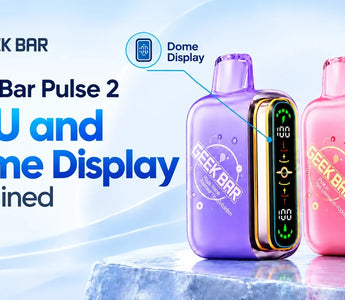
Another major upgrade is the Dome Full Screen display.
Instead of having to guess how much battery or e-liquid remains, the Pulse 2 provides key information directly on the device.
The display can show information such as:
Battery status
E-liquid level
Current mode
Device activity and visual indicators
This makes the device easier to monitor during everyday use.
The display is especially useful because the Pulse 2 has two operating modes. Knowing which mode you're using helps explain why the device may feel different depending on your selection.
Regular Mode is designed around the device's longer advertised lifespan, while Pulse Mode is intended to provide a more intense experience with a lower advertised puff count.
It's also important not to confuse the Pulse 2 display with the display on the Geek Bar Mate 60K. The Mate 60K uses a Dynamic Galaxy UI, while the Pulse 2 uses the Dome Full Screen system.
The Binary Orbit Light System is another visual feature built into the Pulse 2.
While the main display provides useful information, the Binary Orbit system focuses primarily on visual feedback and lighting effects. It can indicate device activity while adding an animated element to the design.
In simple terms:
Dome Full Screen: Shows useful device information.
Binary Orbit Light System: Provides visual feedback and lighting effects.
VPU: Helps manage device performance.
Dual mesh coil: Produces the vapor.
Adjustable airflow: Lets users control the draw.
The combination gives the Pulse 2 a more modern appearance than the original Pulse while also making the device's status easier to understand.
The VPU and display serve different purposes, but both contribute to the Pulse 2's overall design.
The VPU focuses on how the device operates. Geek Bar claims improvements in e-liquid retention, effective puff output, and vapor production.
The Dome Full Screen focuses on information and visibility, allowing users to monitor important details such as battery, e-liquid, and mode.
Then there is the 0.8Ω dual mesh coil, adjustable airflow, USB-C charging, and two operating modes.
These features help explain why the Pulse 2 is positioned as a second-generation upgrade rather than simply a device with a larger advertised puff count.
If you're deciding between the two operating settings, our guide to Geek Bar Pulse 2 Regular Mode vs Pulse Mode explains how the modes differ and which type of experience each is designed for.
For a broader look at the device, including its specifications, features, performance, and value, check out our Geek Bar Pulse 2 25K review.
The Geek Bar Pulse 2's technology becomes much easier to understand when each feature is looked at separately.
The upgraded VPU is designed to manage performance more effectively, with Geek Bar claiming improvements in e-liquid retention, puff output, and vapor production. The 0.8Ω dual mesh coil works with the system to produce vapor, while adjustable airflow gives users more control over the draw.
The Dome Full Screen display puts important information directly on the device, while the Binary Orbit Light System provides visual feedback and adds to the device's appearance.
Together, these features make the Pulse 2 more than simply a higher-puff successor to the original Pulse. They are central to what Geek Bar has changed in this second-generation device.
Ready to explore the Pulse 2? Shop the Geek Bar Pulse 2 25K at FlyingVape and learn more about its VPU, dual mesh coil, adjustable airflow, and Dome Full Screen display.
Nicotine products are intended for adults of legal purchasing age only. Nicotine is addictive. Check your local laws and regulations before purchasing or using nicotine products.
Your cart is currently empty.
Start Shopping