
Sep 21st 2026 — Flying Vape
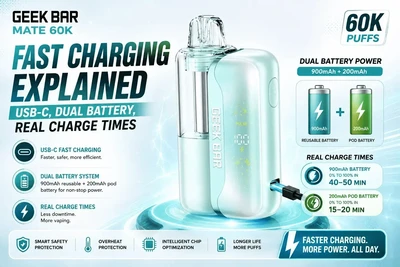
If you're considering the Geek Bar Mate 60K, you've probably noticed that it features something many disposable-style vapes don't—a dual-battery system. Unlike traditional devices that rely on a single battery, the Mate 60K combines a reusable device battery with a smaller battery built into each pod. This unique setup is designed to deliver longer-lasting performance while supporting the device's modular design.
Many users also search for Geek Bar Mate 60K charging because they want to know how quickly the device charges, how the two batteries work together, and whether both batteries require charging separately.
For the full breakdown of specs, features, and overall value, see our complete Geek Bar Mate 60K review.
In this guide, we'll explain everything you need to know about the Geek Bar Mate 60K's charging system, including how the dual batteries function, what Geek Bar's fast-charging claim means, and how you can extend battery life between charges.
Two Batteries, Not One — How the 900mAh + 200mAh System Works
One of the biggest innovations of the Geek Bar Mate 60K is its dual-battery design.
Instead of placing a single battery inside a disposable device, Geek Bar separates the power system into two parts:
The Main Device Battery
The reusable device contains a 900mAh rechargeable battery.
This battery powers:
-
The display screen.
-
The chipset.
-
The airflow system.
-
The heating process.
-
The overall operation of the device.
Since the battery stays with the reusable device, you continue using it when replacing pods.
The Pod Battery
Each replacement pod also contains a 200mAh battery.
When the pod is connected magnetically to the main device, both batteries work together, providing a combined battery capacity of 1,100mAh.
This design helps maintain consistent performance throughout the life of the pod while supporting the device's high puff count.
Unlike traditional disposable vapes, replacing the pod also introduces a fresh auxiliary battery into the system.
Why Does Geek Bar Use Two Batteries?
At first glance, adding a battery inside the pod might seem unnecessary.
However, there are several practical reasons behind this design.
Better Power Distribution
Instead of relying on one battery to power everything, the workload is shared between the reusable device and the pod.
This can help deliver stable performance throughout extended vaping sessions.
Supports High Puff Counts
The Mate 60K is designed to deliver:
-
Up to 60,000 puffs in Regular Mode.
-
Up to 30,000 puffs in Pulse Mode.
A dual-battery system helps provide the energy needed to support these manufacturer-rated puff counts.
Consistent Performance
Because each new pod includes its own battery, performance remains more consistent over time instead of depending entirely on an aging rechargeable battery.
USB-C Fast Charging — What "80% in 20 Minutes" Actually Means
The Geek Bar Mate 60K supports USB-C charging, which has become the standard for many modern vaping devices.
Geek Bar states that the device can reach approximately 80% battery capacity in around 20 minutes.
It's important to remember that this is the manufacturer's published specification, not an independently verified test.
Actual charging speeds may vary depending on several factors, including:
-
The power output of your wall adapter.
-
The quality of your USB-C cable.
-
Battery temperature.
-
Remaining battery level.
-
Environmental conditions.
Even if charging times vary slightly, USB-C still offers a faster and more convenient experience than older charging standards.
How Long Does a Full Charge Take?
Although Geek Bar highlights its "80% in approximately 20 minutes" specification, reaching 100% charge naturally takes longer.
As with most rechargeable batteries, charging slows down during the final portion of the cycle to help protect battery health.
Because of this, users should expect:
-
A rapid charge during the first part of the charging cycle.
-
Slower charging as the battery approaches full capacity.
-
Slight differences depending on charging equipment and battery condition.
For the best results, use a quality USB-C cable and a compatible charging adapter.
Avoid using damaged cables or unreliable power sources, as they can reduce charging efficiency.
Does the Pod Battery Ever Need Separate Charging?
No.
One advantage of the Geek Bar Mate 60K's modular design is its simplicity.
Although each pod contains a 200mAh battery, it does not require separate charging.
Once the pod is connected to the reusable device through its magnetic connection, the charging process is handled automatically.
There are:
-
No additional charging ports on the pod.
-
No separate charging cables.
-
No extra setup required.
Simply charge the main device using the USB-C port, and the system manages the rest. Not charging like it should? Our Mate 60K troubleshooting guide covers the most common charging and connection issues.
This makes replacing pods quick and convenient while keeping the overall experience user-friendly.
Tips to Extend Battery Life Between Charges
Even with a combined battery capacity of 1,100mAh, a few good habits can help you get more time between charges.
Use Regular Mode for Everyday Vaping
Regular Mode is designed to maximize efficiency.
Because it uses less power than Pulse Mode, it generally allows the battery to last longer.
Pulse Mode produces stronger vapor but also increases battery consumption.
Avoid Long Continuous Puffs
Taking several long draws in quick succession places greater demand on the battery and coil.
Allowing a few seconds between puffs can help maintain more consistent performance.
Keep Charging Contacts Clean
The magnetic connection between the pod and device should remain clean and free from dust or e-liquid residue.
Dirty contacts can affect charging performance and electrical connectivity.
A soft, dry cloth is usually enough for routine cleaning.
Charge Before the Battery Is Completely Empty
Lithium-ion batteries generally perform best when they are recharged before becoming fully depleted.
Charging the device regularly can help maintain consistent performance over time.
Use Quality Charging Accessories
Using a reliable USB-C cable and a suitable power adapter helps ensure efficient charging while reducing the risk of connection issues.
Common Charging Questions
Can I vape while the device is charging?
Always refer to the official user instructions supplied with your device. If this feature isn't specifically mentioned by Geek Bar, it's generally best to allow the battery to charge uninterrupted.
Will Pulse Mode drain the battery faster?
Yes.
Pulse Mode increases power output, which naturally uses more battery than Regular Mode.
Do I need to replace the battery?
The reusable battery remains part of the main device.
When the pod reaches the end of its life, you simply replace the pod—not the rechargeable battery unit.
Does every replacement pod include a battery?
Yes.
Each Mate 60K pod contains its own integrated 200mAh battery as part of the dual-battery system.
Final Thoughts
The Geek Bar Mate 60K charging system is one of the features that sets this device apart from many traditional disposable vapes. Its innovative dual-battery design combines a reusable 900mAh device battery with a 200mAh battery inside every pod, creating a total capacity of 1,100mAh while supporting long-lasting performance.
USB-C charging adds another layer of convenience, and Geek Bar reports that the device can reach approximately 80% charge in around 20 minutes under its stated testing conditions. As with any rechargeable device, actual charging times may vary depending on your charger, cable, and usage habits.
If you want to maximize battery life, using Regular Mode, keeping the charging contacts clean, and using quality charging accessories can all help improve day-to-day performance.
To learn more about the technology behind the device, read our guide on What Is the VPU Chip in the Geek Bar Mate 60K? You can also explore our Geek Bar Mate 60K Review for a complete breakdown of its features, performance, and whether it's the right device for your vaping style.
Ready to try the dual-battery system for yourself? Shop the Geek Bar Mate 60K Kit.